Scenarios and Criteria
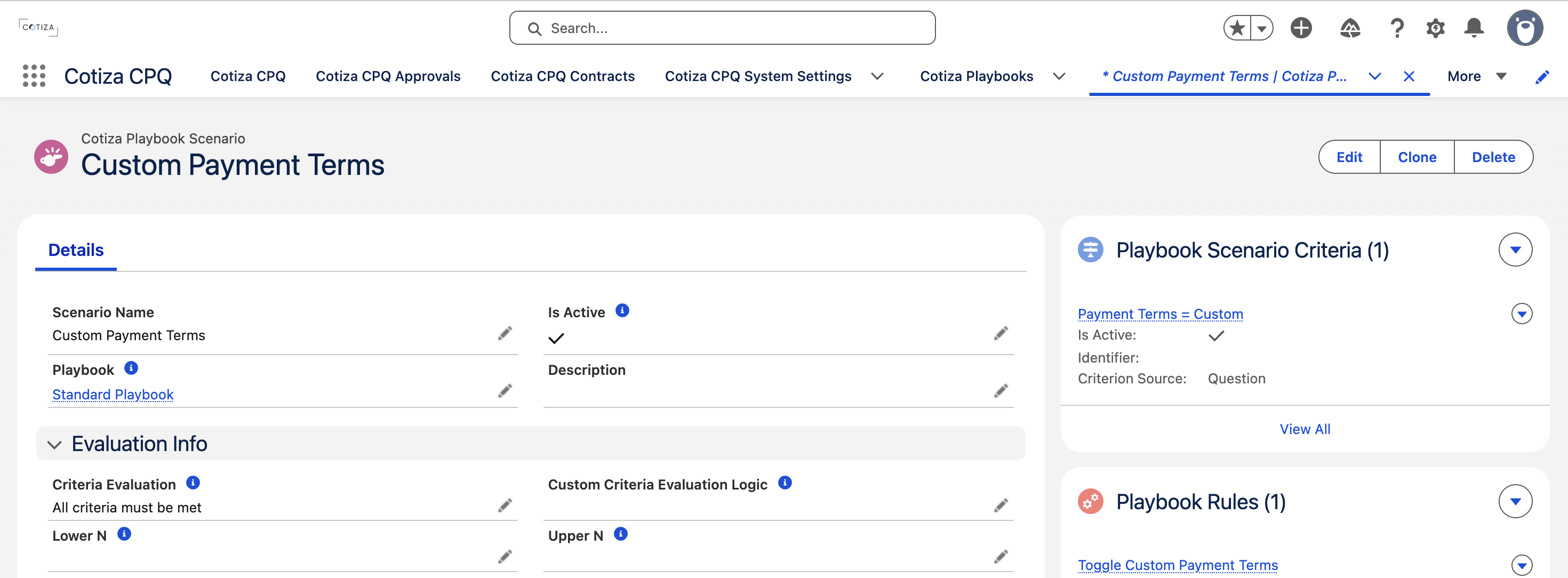
Playbook Scenarios define conditions that control Rules, Approvals, and View Sections. Each Scenario is evaluated from one or more Criteria records.
Scenario overview
A Playbook Scenario groups criteria with boolean logic. When the Scenario evaluates to TRUE, dependent configuration can fire.
Scenarios are referenced by:
- Playbook Rules
- Playbook Approvals
- Playbook View Sections
- Individual Rule Actions (optional per-action Scenario)
Building criteria
Each Playbook Scenario Criterion compares a source value against a target using an operator.
Criterion sources
| Source | Evaluates |
|---|---|
| Question | A Playbook Question answer |
| Product | Aggregated values from Quote Line Items |
| Price book entry product | Values from PricebookEntry records (not valid for View Section evaluation) |
| System Value | Built-in CPQ values (quote term, dates, etc.) |
Comparison operators
Criteria support standard comparisons (equals, not equals, greater than, less than, contains, etc.) depending on field type. Multiple criteria combine using boolean expression logic defined on the Scenario.
Inverse scenarios
Enable Inverse Scenario on Rules, Approvals, or View Sections to trigger when the linked Scenario is not met.
Scenario evaluation in the UI
The rules engine (configQuoteEvaluator) evaluates scenarios client-side after each user interaction. Results drive:
- Which Rules execute (based on Execute When timing)
- Which Approvals appear in the Approval Summary
- Which View Sections appear in proposal previews
See Rule Evaluation for execution timing details.
Common patterns
Discount threshold approval
Create a Scenario where a discount Question answer exceeds a threshold. Link it to a Playbook Approval requiring manager sign-off.
Conditional product sections
Create a Scenario where a product exists on the Quote. Link View Sections that only show relevant product tables.
Rule-gated automation
Create a Scenario tied to a picklist answer. Link Rules that add products or stamp values only when that answer is selected.
Debugging scenarios
- Verify each Criterion source references the correct Question or product field
- Check Inverse Scenario flags on dependent records
- Use CPQ Power User to pause rules and inspect intermediate answer values
- Review Execution Order on Rules that may change values mid-evaluation