Products and Pricing Setup
This guide covers configuring the product catalog, price books, and tiered pricing for Cotiza CPQ.
Product catalog
Products (Product2)
Create and activate standard Salesforce Products. Cotiza extends Product2 with CPQ-specific fields documented in Product.
Price books (Pricebook2)
Each active Playbook links to a Price Book. The price book must be active for the Playbook to appear in CPQ.
Cotiza supports multi-currency via child price books linked through Parent Price Book on Pricebook2.
Price book entries (PricebookEntry)
Each product sold through CPQ needs an active PricebookEntry in the Playbook's price book.
Key Cotiza fields on PricebookEntry:
| Field | Purpose |
|---|---|
| Pricing Set Identifier | Links the entry to a Pricing Set for tiered pricing |
| Date Split Types | Allowed date split options (Monthly, Quarterly, Semiannually, Annually, Custom) |
| Additional fields | Quantity increments, removable flags, and other line-item behavior |
See Price Book Entry for the full field list.
Simple pricing
For straightforward price × quantity models, populate UnitPrice on PricebookEntry. Cotiza uses list price unless overridden by rules or pricing sets.
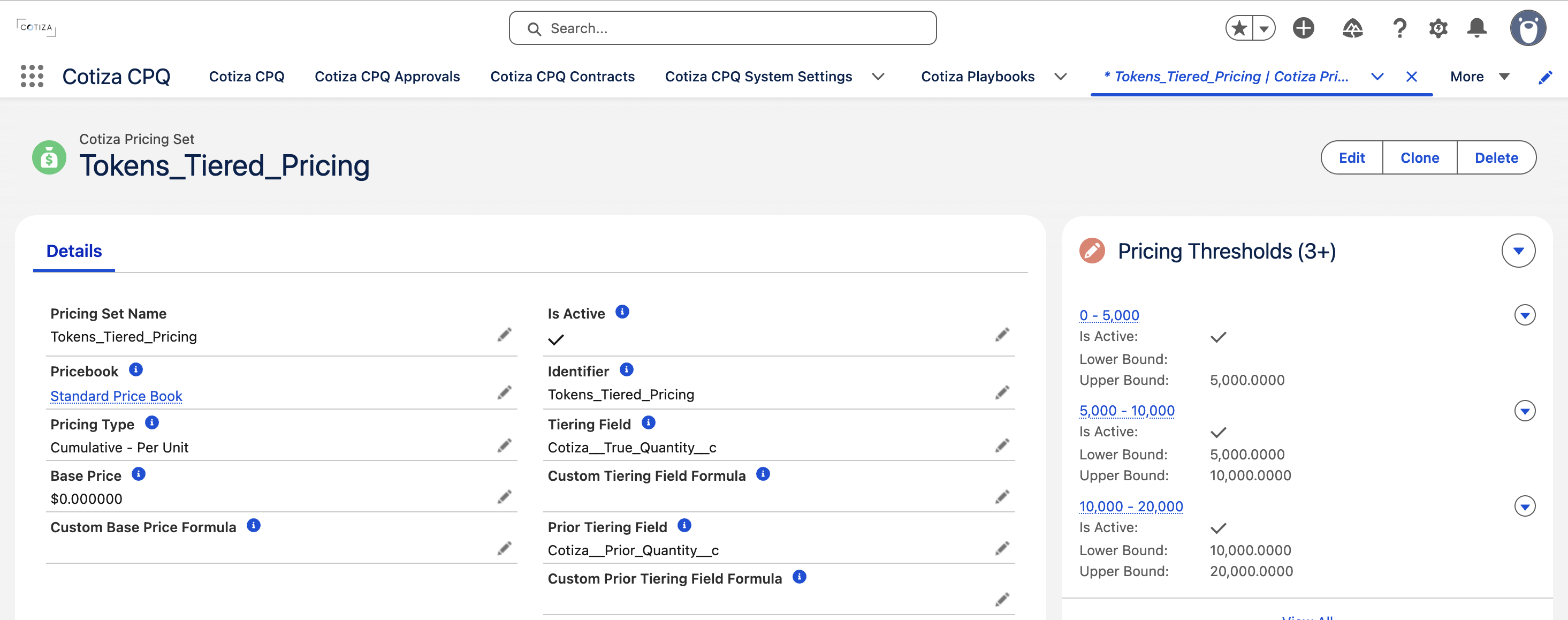
Tiered pricing with Pricing Sets
1. Create a Pricing Set
Pricing Set records define:
| Field | Purpose |
|---|---|
| Identifier | Token referenced from PricebookEntry |
| Pricebook | Parent price book |
| Pricing Type | Tiering behavior (see below) |
| Tiering Field | Field quantity tiers are evaluated against |
| Base Price | Starting price before thresholds apply |
Pricing types
| Type | Behavior |
|---|---|
| Single Tier - Per Unit | First matching threshold sets unit price for all units |
| Single Tier - Flat | First matching threshold sets total price as if quantity were 1 |
| Cumulative - Per Unit | Each threshold applies to its corresponding quantity band |
2. Create Pricing Thresholds
Pricing Threshold records define numeric ranges and resulting prices within a Pricing Set.
Custom formulas on Pricing Sets and Pricing Thresholds support comparison operators and ternary expressions in addition to standard arithmetic and piped CPQ tokens.
3. Link to products
Set Pricing Set Identifier on each PricebookEntry to connect products to their pricing set.
Dynamic pricing with rules
Playbook Rules can override or supplement pricing set calculations by stamping line item fields or question answers. Calculation Item formulas support comparison operators and ternary expressions in addition to standard arithmetic. See Pricing Rules and Rules Cookbook.
Date splits
When Date Split Types are configured on PricebookEntry, users can split a line item across date ranges (e.g., monthly billing within a annual term). Each split creates separate QuoteLineItem records.
Users configure splits in the Date Split Modal during quote configuration.
Pricing refresh
System Settings Line Item Pricing Fields Refresh controls when pricing fields recalculate during user interactions.